How to figure out what a Semantic Model is.
Welcome to the post about figuring out what a “Semantic Model” is. For the past few years, Microsoft has been referring to the data you use in a Power BI report as a “Semantic Model”… so what exactly is it and does using a Semantic model affect what we do in Power BI?
If you want to use the same Power BI file I screenshot in the written summary below, here’s the pbix file to download. You can also click the graphic below to get it.

Written Instructions:
We have a Power BI report here with nothing built on the canvas, and that’s okay… we’re mostly interested in the data we have connected to this Power BI file.
If we click into the Model View, we can see it.
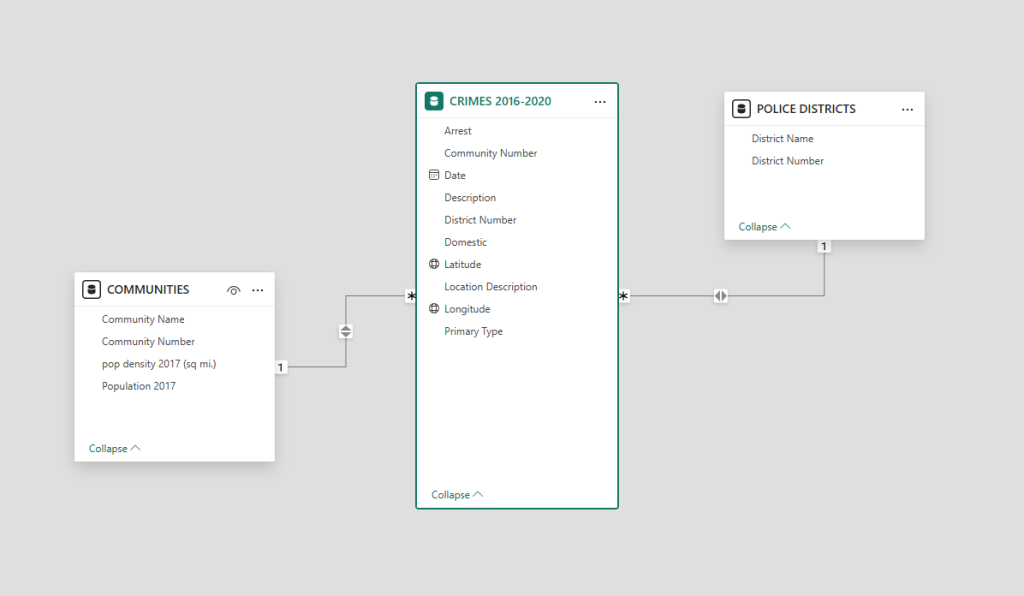
This is the data model for our report. We have some data about crimes in Chicago in our main table, and we also have to additional tables with information about each of Chicago’s 77 communities (they use these communities to split the city into administrative districts) and also a table with a bit of information about different police districts.
The Communities table is linked to the Crimes table with a Community number field that’s common to both, and the Police Districts table is linked to the Crimes table with a District number that’s common to both tables.
We have a post all about building relationships here, if you’d like to know more about that.
This is the data model (or the dataset) for our report. Each of these tables of data comes from much larger tables of data from Chicago’s Open Data website, which if you follow that link has Crime data dating back to 2001, but we’ve brought in only the data we need for what we are building. We’ve only brought in data from 2016 to 2020, and only select columns.
A couple years ago, Microsoft made the announcement that Data Models weren’t going to be called Data Models or Datasets any more. Instead they were going to call them “Semantic Models“.
So, now when you read something by Microsoft (or one of the many Microsoft fans out there) about connecting to a dataset, they’ll say “connect to your Semantic Model.”
It doesn’t actually mean ANYTHING. Microsoft is gatekeeping here and trying to make things sound a bit more jargony and confusing as part of their Fabric services (read about what Fabric is in this post.)
Literally nothing has changed. Connecting to a “Semantic Model” (in whatever form it’s in, whether a spreadsheet, a SQL database, an Open Drive spreadsheet, a google sheet, or even a combination of all of them) is connecting to a dataset. It’s exactly the same.
What Microsoft has done here is thrown in the word Semantics, which broadly means “meaning” and tries to make a case that the dataset that a Power BI file connects to should be called a Semantic Model because it has meaning for your report. It’s the data you need to visualize (and only the data you need to visualize).
Some Microsoft fans think the term Semantic Model is great because it “better reflects the functionality of data analysis data models, which are what Power BI reports are based on.” which is jargony speak for “your data model should be relevant for your Power BI report.”
I still use the term “dataset” because it’s a term everyone understands, and the first thing I teach in my workshops about connecting to data is that you should only connect to data that has meaning for what you’re building.
So, in summary, “Semantic Model” means a dataset with meaning, and if you build Power BI reports correctly, your dataset will ALWAYS have meaning, and never have extraneous data that doesn’t.
Semantic Model is unnecessary jargon by Microsoft.
But it’s just your data model or dataset built to be meaningful for your report. Nice and easy.
Take care everyone,
Joe.
More posts about Power BI Admin
Posts about Power BI Concepts
Like these posts but need more formal (but still engaging and fun) training in Power BI? Contact me, Joe Travers or at joe@traversdata.com. I got you.

Contact Joe | TraversData.com | People-Friendly Power BI | LinkedIn